Ignite
Why Ignite
AI just gave everyone the ability to ship an app. It didn’t give everyone the ability to secure one. Product managers, analysts, and non-engineers across your org can now build real, working applications with an AI assistant - no CS background, no security training, no idea what a hardcoded secret or an unbounded LLM call costs downstream. That code is already reaching your GitHub org.
The volume is the actual problem: your AppSec team can review a handful of PRs a week with real scrutiny. It cannot review the avalanche of AI-generated projects that non-engineers can now produce on their own - the review bottleneck didn’t scale when the code-generation bottleneck disappeared.
Ignite is the review layer for that gap: a self-hosted gate that runs the scrutiny your team can’t scale to - automatically, on every project, before anything reaches your org’s GitHub - whether or not the person who wrote the code knew to ask for it.
A compliance gate for shipping code into a GitHub org. Ignite runs a
project through a battery of deterministic, purpose-built static analysis
tools - a real SAST engine (Semgrep), CVE/GHSA lookups (deps.dev), IaC/
container scanners (Trivy, Checkov, hadolint), a supply-chain malicious-
dependency scanner (GuardDog), secret scanning (regex + gitleaks), image
signature verification (cosign), PII data-flow tracing (Bearer), API schema
linting (Spectral), and your org’s own governance CI (act) - entirely on
your machine. A local LLM adds one additional, optional layer for
logic-level review; it is not what does the SAST or CVE detection below.
Only if every check passes (or every blocking issue is justified and
overridden) does anything get provisioned or pushed.
Three ways to run it: upload through the web app (below); drop the pre-push git hook into any repo so pushes are gated locally without a separate upload step; or, preventively during development, call the same checks as MCP tools from your coding agent, before code is even committed.
View the full technical README on GitHub »
Not “just an LLM wrapper.” Most of what’s below is static analysis by dedicated tools with no model in the loop at all - the same category of tool a dedicated SAST/SCA platform runs, wired into one pipeline with a single review gate. The LLM deep-scan (off-able independently via
LLM_DEEP_SCAN_ENABLED) is a supplementary pass for the kind of logic-level reasoning pattern-matching can’t do, not a replacement for the static engines.
How it works
1. Upload a project - checks run locally, streamed live
Drop a ZIP or a folder onto the app, name the target org/repo, and hit Initiate Onboarding Pipeline. Every phase - structure audit, secret scan, license compliance, AI-governance, IaC/supply-chain/SAST scanning, your org’s governance CI - streams its log output live as it runs. Nothing leaves the machine until the run passes.
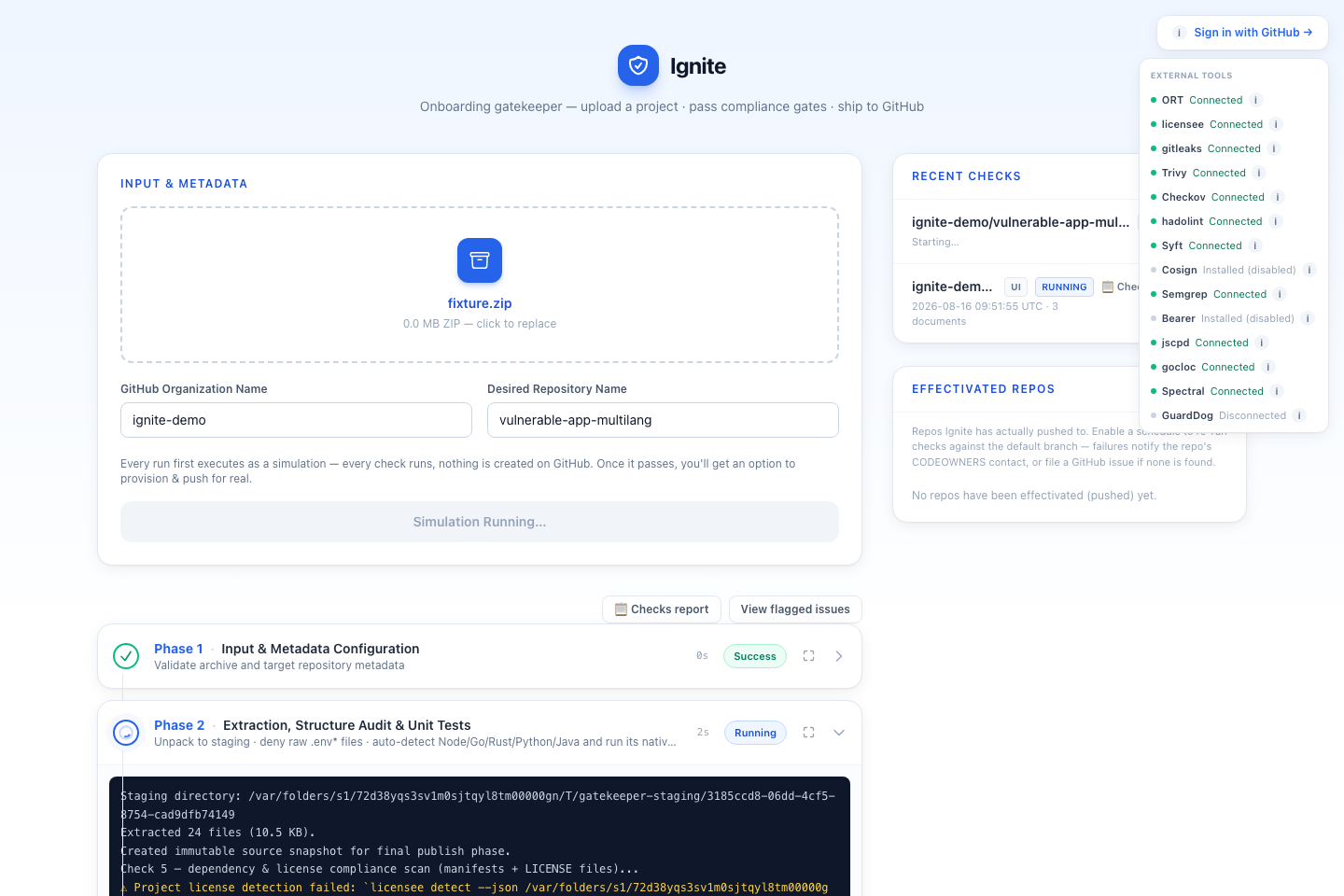
2. Nothing ships until every finding is reviewed
Before anything is provisioned or pushed, Ignite pauses at a final review gate listing every flagged issue - blocking and advisory - with the exact code snippet behind each one. A blocking issue needs a justified override (logged to an audit trail and emailed) or a source fix before the run can continue.
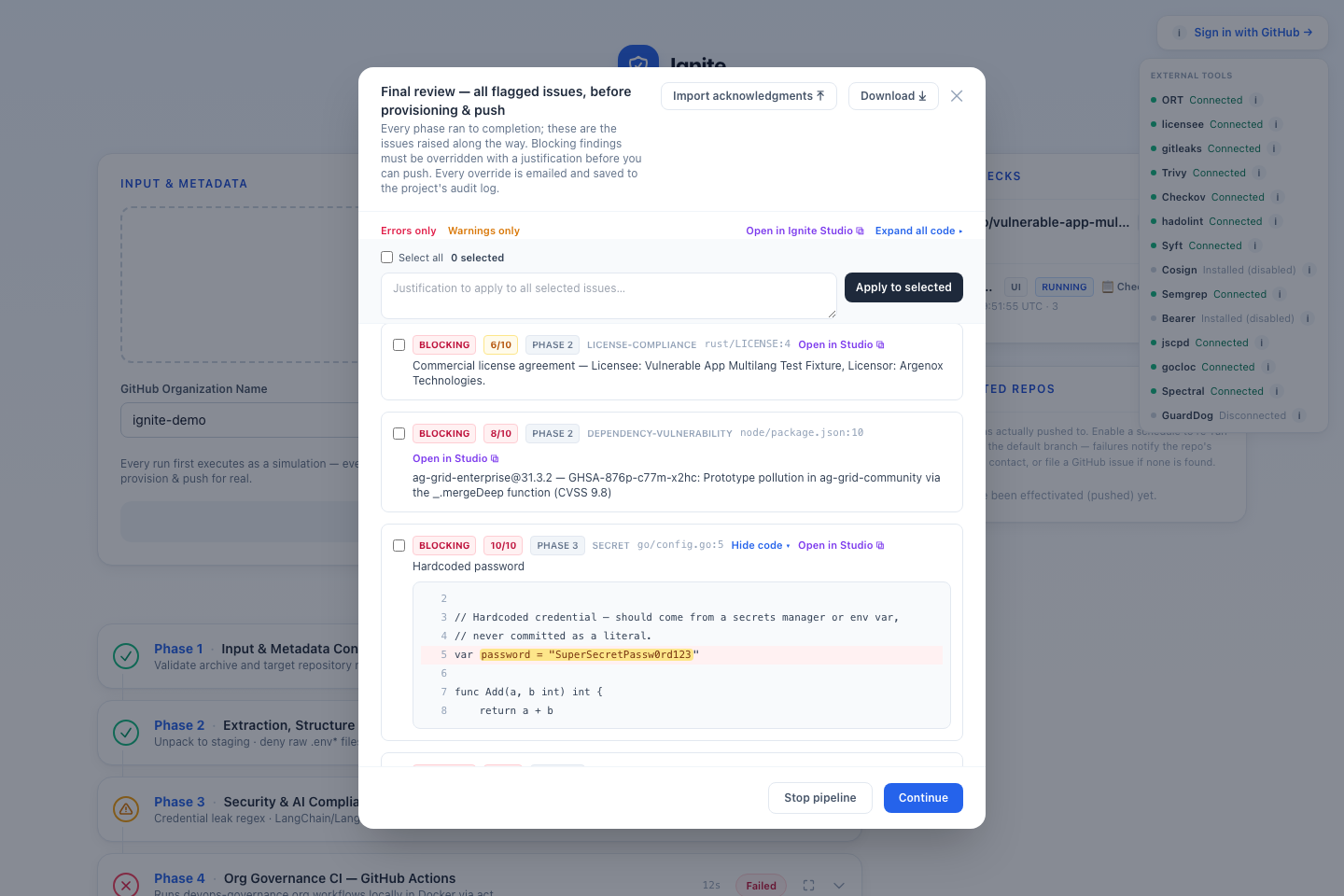
3. Ignite Studio - AI-assisted triage, in place
Every finding is addressable in Ignite Studio: browse the staged file tree, jump straight to the flagged line, and ask the AI to explain the issue in plain language or suggest a concrete fix for that exact snippet - independent of whether the automated LLM deep-scan itself is enabled for that run.
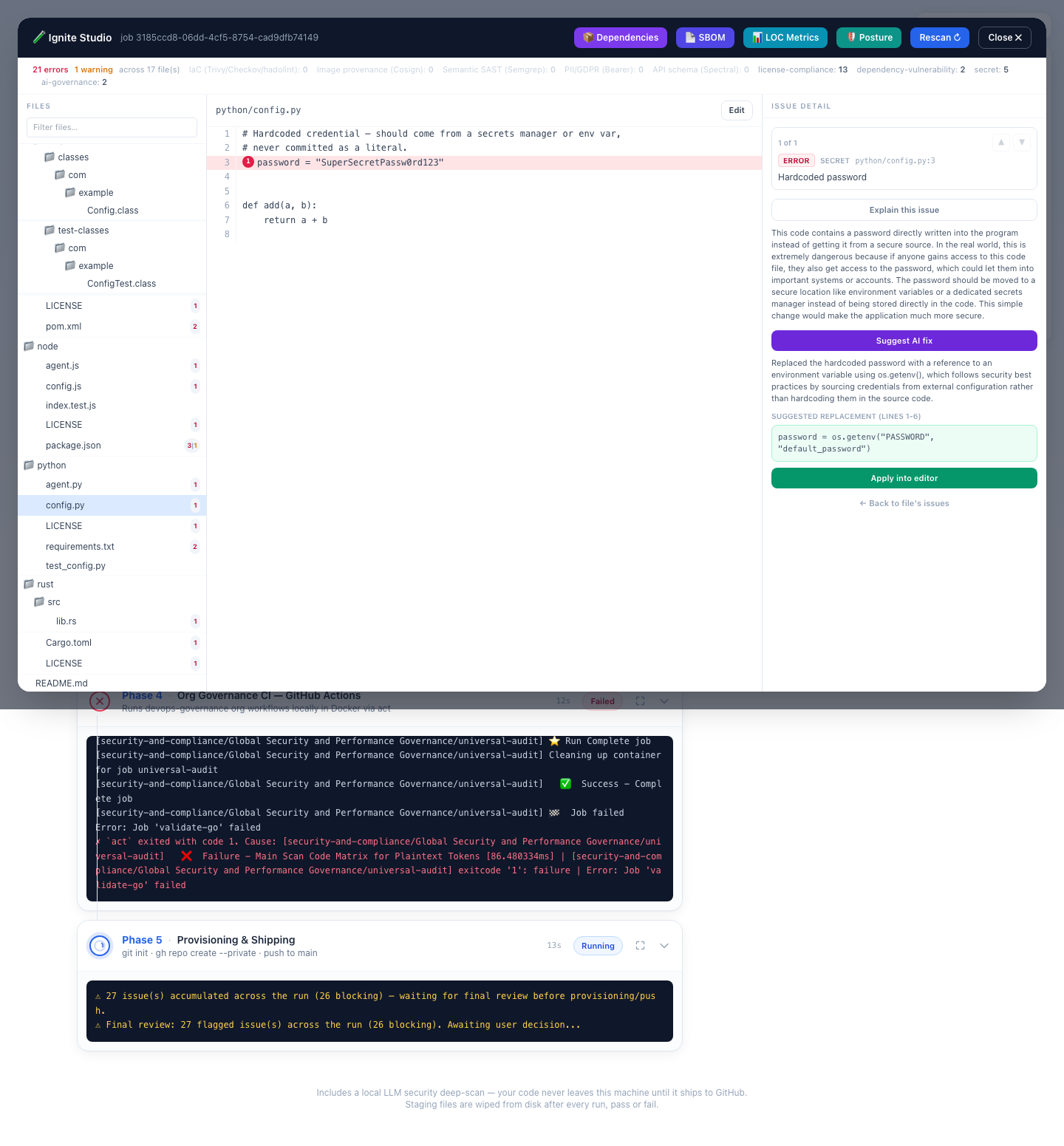
4. Studio’s other views - dependencies, SBOM, LOC, posture
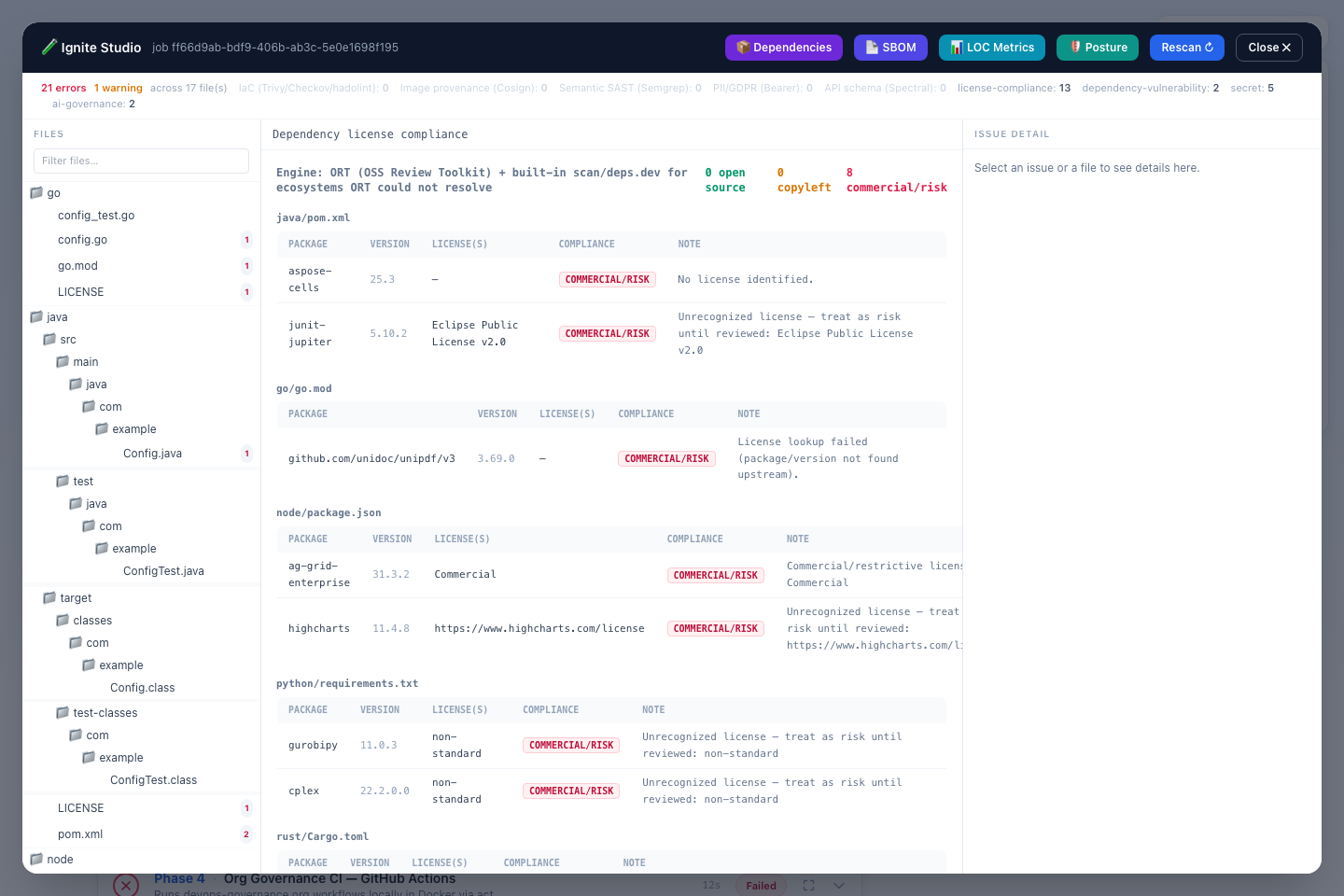
Ignite Studio’s top bar has one button per connected tool’s non-issue output, each recomputed live against the still-staged project:
📦 Dependencies - every manifest dependency’s real license, resolved via ORT (or the built-in parser + deps.dev fallback) and classified green/amber/red, grouped by manifest file.
📄 SBOM - a CycloneDX-style component inventory generated by Syft, attached as a downloadable project document.
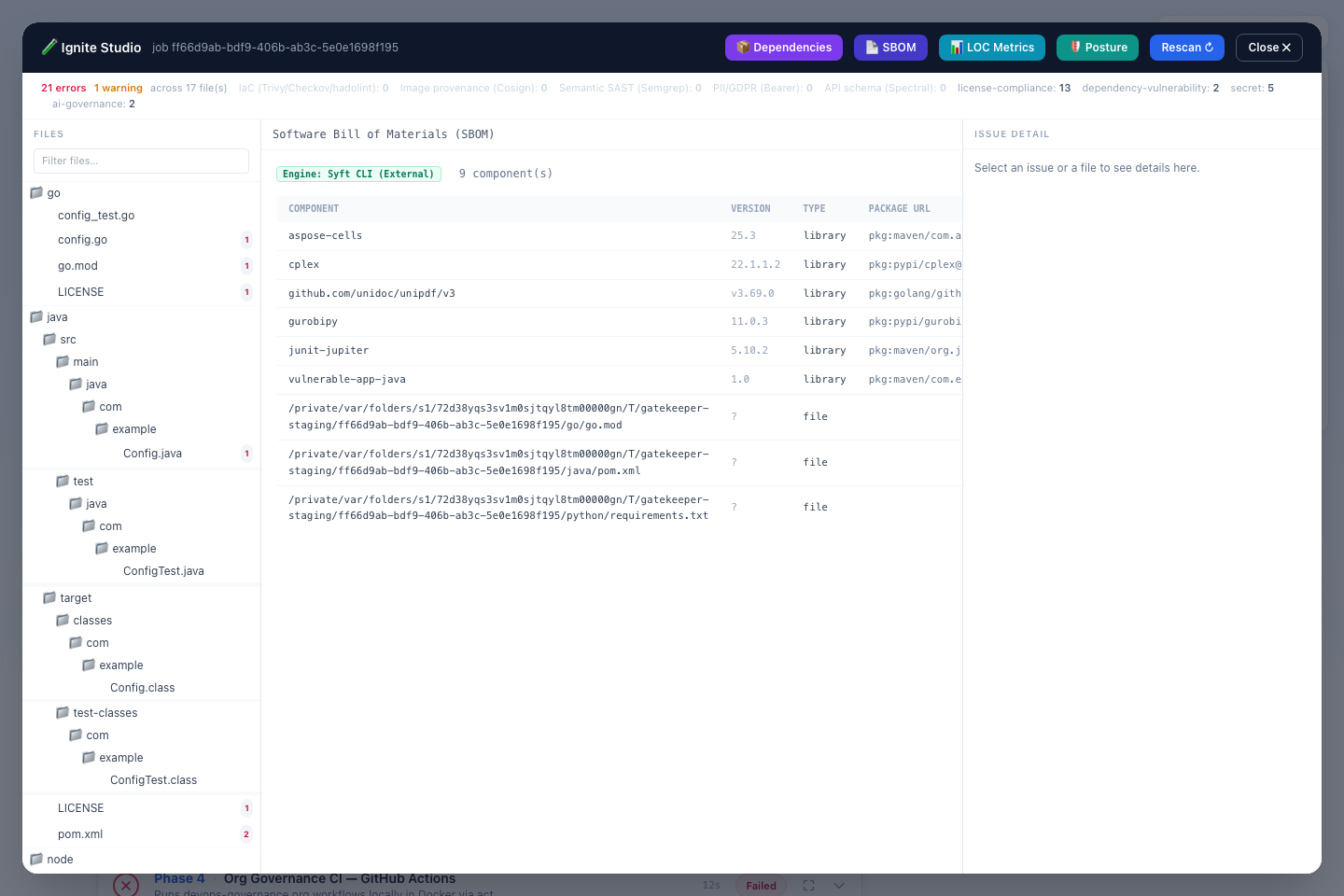
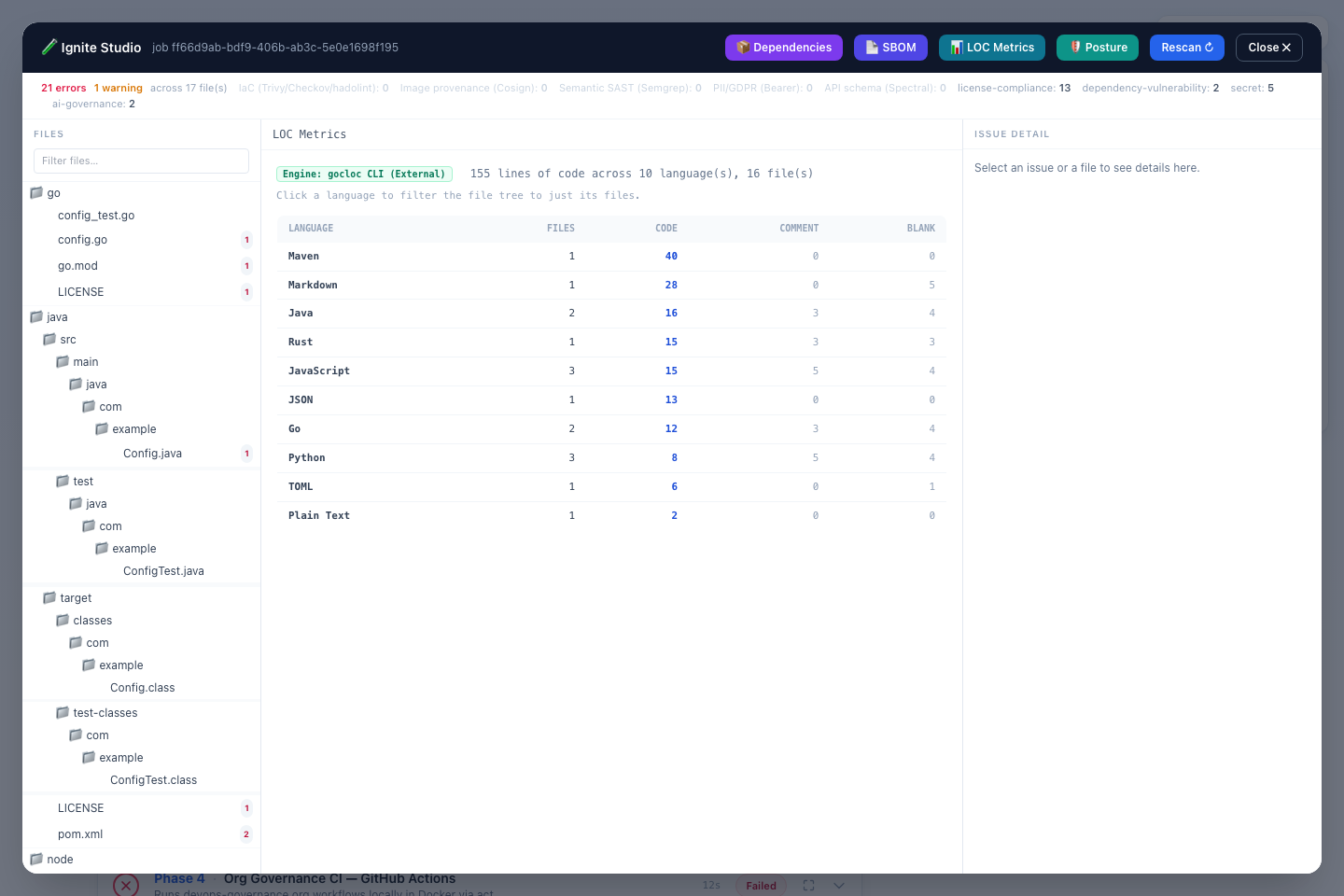
📊 LOC Metrics - per-language line/file counts via gocloc; click a language to filter the file tree to just its files.
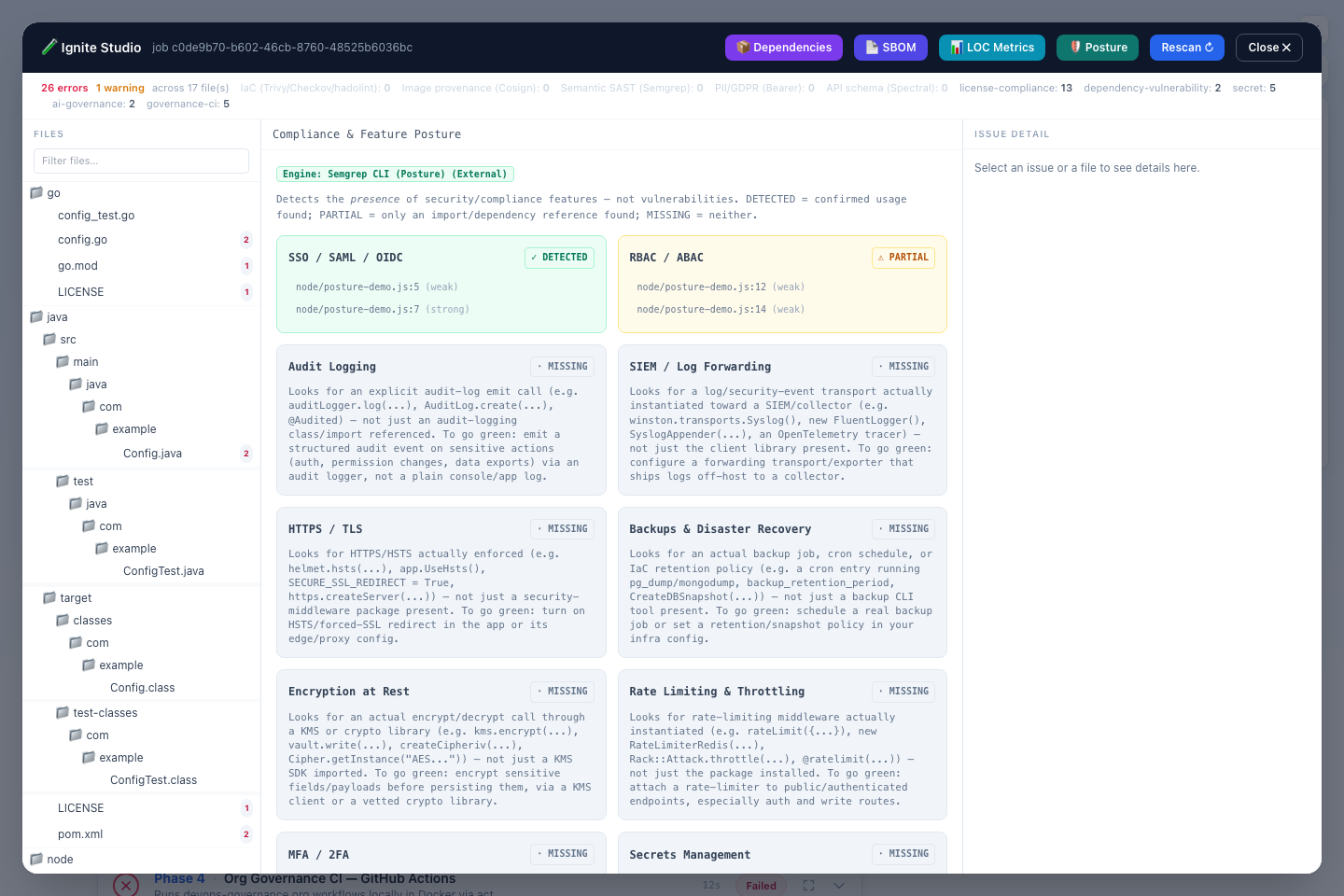
🛡️ Posture - the Compliance & Feature Posture Engine’s DETECTED/PARTIAL/MISSING grid across eight security/compliance categories (SSO, RBAC, audit logging, TLS, backups, encryption at rest, rate limiting, secrets management) - a MISSING card explains exactly what the check looks for and what to add to turn it green.
What gets checked
Six phases and twelve+ optional external-tool integrations (all soft dependencies - Ignite works without any of them installed, falling back to a built-in check where one exists). Most of this list is static analysis by a dedicated tool, no LLM involved:
- Hardcoded secrets & credential leakage - regex scan + gitleaks (static)
- Known-CVE dependencies - deps.dev/OSV lookups against resolved versions (static, deterministic - not a guess)
- Newly-published, not-yet-disclosed malicious dependencies - GuardDog’s supply-chain heuristics (static)
- Dependency license risk (commercial/copyleft) - ORT/licensee + deps.dev (static)
- Semantic vulnerabilities - Semgrep’s
p/security-auditSAST ruleset (static, real SAST - not the LLM) - IaC/container misconfiguration & supply-chain image provenance - Trivy, Checkov, hadolint, cosign (static)
- PII/GDPR data-flow exposure - Bearer’s source-to-sink tracing (static)
- Missing security/compliance posture (SSO, RBAC, audit logging, rate limiting, …) - Semgrep-backed pattern matching (static)
- Your org’s own governance CI, run locally via
actbefore it ever reaches a real PR (static, runs your actual workflows) - Ungoverned AI/LangChain invocations - regex/AST check (static)
The one LLM-driven check is the local deep-scan pass: injection, path
traversal, SSRF, insecure deserialization, XSS, weak crypto, and similar
logic-level flaws that a fixed rule set can miss. It’s independently
toggleable (LLM_DEEP_SCAN_ENABLED) - everything above it in this list
keeps running exactly the same with it off.
Every check exists to stop a specific class of real-world incident, not just to produce a finding for its own sake. The table below maps each threat to the tool/check combination that catches it - and, since every external tool is a soft dependency, exactly which tool actually intervenes if it’s installed (Ignite still runs, and falls back where it can, if it isn’t).
| Threat / attack class | How Ignite catches it | Tool(s) / check | Phase | If the tool isn’t available |
|---|---|---|---|---|
Committed raw .env/.env.* files leaking live credentials into repo history |
Denies any .env/.env.* file anywhere in the tree (unless already .gitignored) before anything else runs |
Built-in structure audit | 3 | N/A - built-in, no external tool involved |
| Hardcoded secrets in source (API keys, passwords, tokens, private keys) | Regex scan over every text file; gitleaks runs as a supplemental pass over the same tree when enabled, merged and deduped against the regex hits | Built-in regex scan + gitleaks (optional) | 4 | The built-in regex scan always runs regardless; only gitleaks’s supplemental pass is skipped |
Runaway/uncontrolled AI agent loops - unbounded LangChain/LangGraph .invoke()/.stream() calls (cost blowup, infinite loops, larger prompt-injection blast radius) |
Flags any .invoke(/.stream(/.ainvoke(/.astream( call missing recursion_limit |
Built-in AI-governance regex check | 4 | N/A - built-in, no external tool involved |
SQL injection - unparameterized/string-concatenated queries, tainted input reaching a raw query or ORM .raw()/.exec() call |
Two independent passes: (1) Semgrep’s p/security-audit ruleset ships dedicated SQL-injection rules per language/framework (Node pg/mysql/Sequelize, Python psycopg2/Django ORM .raw(), Java JDBC/JPA, PHP PDO, Ruby ActiveRecord, …) flagging a query built by concatenating/interpolating unsanitized input instead of bound parameters; (2) the local LLM deep-scan is explicitly prompted to read the data flow and flag SQL injection it finds, including patterns with no rule yet |
Semgrep + LLM deep-scan (security pass) | 4 | Semgrep: skipped entirely if missing - no built-in fallback, but the LLM pass still covers this independently. LLM: skipped with a warning if the endpoint is unreachable - Semgrep’s rules still catch it on their own |
Command injection, template injection, path traversal, SSRF, insecure deserialization, XSS, broken auth/authz, weak crypto, unsafe eval/exec, prototype pollution, insecure temp files, missing input validation |
Same two independent passes as SQL injection above, same reasoning | LLM deep-scan (security pass) + Semgrep | 4 | LLM pass: skipped with a warning if the endpoint is unreachable. Semgrep: skipped entirely if missing - no built-in fallback for a rule engine, but the LLM pass still covers this ground independently |
| Dependency with a known, already-disclosed CVE/GHSA advisory | Resolves each manifest dependency’s real version and cross-references deps.dev’s aggregated OSV/GHSA data | Built-in scanner + deps.dev API | 3 | Not tied to a locally-installed tool - that specific lookup just fails soft (marked unresolved, not blocking) if deps.dev is unreachable |
| Dependency that is malicious but has no advisory yet - install-script exfiltration, obfuscated/encoded payloads, silent network calls, typosquatting | Downloads and statically inspects each npm/PyPI dependency’s actual package contents against Semgrep-based supply-chain-attack heuristics | GuardDog (on by default if installed) | 4 | Check skipped entirely - no fallback (this heuristic can’t be meaningfully approximated) |
| Commercial/proprietary/unrecognized dependency licenses creating unreviewed IP/legal exposure; the project’s own license terms | Resolves real per-dependency licenses (ORT, or the built-in manifest parser + deps.dev fallback) and classifies green/amber/red; scans every LICENSE/LICENCE file for commercial/proprietary language |
ORT / licensee / deps.dev | 3 | Falls back to the built-in manifest parser + deps.dev lookup if ORT is missing; the project’s-own-license row is simply omitted if licensee is missing |
IaC/container misconfiguration - privileged containers, missing resource limits, insecure Terraform/Kubernetes/Helm settings, unpinned base images, missing USER |
Trivy’s config scanner is primary, supplemented by Checkov’s larger policy set and hadolint’s Dockerfile-only rules, deduped by file/line/rule-id; falls back to a built-in unpinned-tag/missing-USER heuristic when none are installed |
Trivy + Checkov + hadolint | 4 | Falls back to a built-in Dockerfile heuristic if Trivy is missing; Checkov/hadolint just stop supplementing (fewer findings, same baseline coverage) if they’re missing |
Supply-chain base-image tampering - a Dockerfile FROM image with no verifiable provenance |
Verifies Sigstore/cosign keyless signatures on every unique base image referenced; unsigned images are flagged (advisory) | cosign | 4 | Check skipped entirely - no fallback (signatures can’t be verified without the tool) |
| Logical/semantic vulnerabilities beyond single-line pattern matching | Semgrep’s registry rulesets (p/security-audit by default) |
Semgrep | 4 | Check skipped entirely - no fallback |
| PII/GDPR data-flow exposure - personal data (request params, user objects) reaching logs, DB writes, or third-party calls without controls | Traces data flow from source to sink, filtered to Bearer’s own PII/Personal-Data-tagged findings only | Bearer | 4 | Check skipped entirely - no fallback |
| Copy-pasted vulnerable/stale logic drifting out of sync across a codebase | Flags duplicated code blocks above a configurable threshold (advisory) | jscpd (off by default) | 4 | Check skipped entirely - no fallback (off by default regardless) |
| Insecure API design/contract violations in OpenAPI/AsyncAPI schemas | Lints every discovered schema file (found by content, not filename) against org REST/AsyncAPI conventions | Spectral | 4 | Check skipped entirely - no fallback |
| Missing security/compliance controls that widen the attack surface even with no single vulnerable line - no SSO/MFA, no RBAC, no audit logging, no rate limiting, secrets read from plain env vars instead of a vault, etc. | Classifies presence (not vulnerabilities) of eight security/compliance categories as DETECTED/PARTIAL/MISSING via a dedicated Semgrep ruleset; built-in regex fallback when Semgrep is unavailable | Compliance & Feature Posture Engine (reuses Semgrep) | 4 | Falls back to a built-in regex posture scanner (same weak/strong model, narrower coverage) if Semgrep is missing |
| Org-mandated security/compliance CI gates silently not enforced locally, only caught after a real PR | Runs the actual central ai-guardrails-orchestrator.yml (and every workflow it uses:) locally via act, so local pass/fail matches the real remote gate |
act + Docker | 5 | Soft-skipped with a warning if act/Docker are missing - the workflows still gate remotely on GitHub, just not caught locally before pushing |
| Unauthorized/unvetted code reaching the org’s GitHub regardless of findings above | Provisioning + push only happens after every enabled phase passes (or every blocking issue is overridden with a justified, attributed, emailed audit record) | The pipeline gate itself | 6 | N/A - enforced by the pipeline’s own logic, not an external tool |
| Zip-slip - a malicious archive entry resolving outside the staging directory | Every archive entry’s resolved path is verified to stay inside the staging root before extraction; symlink entries are skipped entirely | Built-in extraction guard | pre-1 | N/A - built-in, no external tool involved |
| Zip-bomb / disk-exhaustion DoS via a malicious or oversized upload | Extracted size capped at 1 GB, upload capped at 250 MB | Built-in size guards | pre-1 | N/A - built-in, no external tool involved |
| Command injection via org/repo names or shelled-out tool arguments | Every git/gh/tool invocation uses execFile with argument arrays (no shell); org/repo names validated against GitHub’s naming rules; commands restricted to a fixed allowlist |
Built-in sanitizers | all | N/A - built-in, no external tool involved |
| The project’s own automated test suite silently regressing | Auto-detects Node/Go/Rust/Python/Java and runs that ecosystem’s native test runner (npm test, go test, cargo test, pytest, mvn test) inside an isolated Docker container |
Built-in detection + Docker | 3 | Skipped if no recognized test setup is found, or if Docker isn’t available - logged, never silently assumed to pass |
| A repo drifting out of compliance after onboarding - a new vulnerable/malicious dependency merged later, with no one notified | Effectivated repos can opt into a scheduled (daily/weekly/monthly) re-check of the default branch; on failure, emails the repo’s CODEOWNERS contact or files a GitHub issue if none can be resolved | Scheduled re-check + CODEOWNERS check | 3 (ongoing) | N/A for the schedule/notify logic itself - the re-check still depends on whichever Phase 4 tools are installed on the server at the time it runs |
A CODEOWNERS-less repo silently having no one accountable for findings |
Advisory check for a CODEOWNERS file and any email-address owner listed in it |
Built-in CODEOWNERS check | 3 | N/A - built-in, no external tool involved |
Full details, install instructions, and the on/off default for every tool: see the README’s tool table.
Also an MCP server - bring these checks into your editor
Beyond the web app, Ignite ships an MCP
server (mcp-server.js) exposing the same guideline/security checks as
tools an AI coding agent can call during development - not just at
onboarding time. Point Claude Code, Claude Desktop, or any other MCP client
at it (stdio, or Streamable HTTP - auto-started alongside npm start on
:51338/mcp) to get:
check_guidelines/check_project- run the same regex/AST guideline checks against a snippet or a whole project directory, live, as you write code.check_dependency_licenses/check_dependency_vulnerabilities- the same license-compliance and CVE/GHSA scans Phase 3 runs automatically, on demand.onboard_project- trigger a full (ordryRun) pipeline run against a running Ignite server, so an agent can “see what would fail” before ever pushing.
This means an agent working on your codebase can catch a hardcoded secret, an ungoverned AI call, or a risky dependency before it’s ever committed - the same gate that blocks onboarding, available as a tool call mid-session.
Acknowledging findings via MCP. onboard_project already accepts
overrides: [{issueId, justification}] and actor: {email, name}, and a
failed run’s response carries the exact unresolved issues (id, category,
severity, summary, file, line) needed to build them - the same shape the
pre-push hook’s CLI acknowledgment works from. An agent
can call onboard_project, read back which findings are still blocking,
call it again with justified overrides for the ones it (or you, via the
agent) decides to accept, and only what’s genuinely unresolved keeps
blocking - no browser involved at any point.
See MCP server in the README for setup.
How to start it
Prerequisites:
- Node.js ≥ 22
- git on
PATH - A way to authenticate to GitHub -
ghCLI is the easy path:gh auth login gh auth status # must show a logged-in account with repo-create permissionbut it’s a soft dependency, not a hard one - see below.
Run it:
git clone https://github.com/nunomcpereira/ignite.git
cd ignite
npm install
npm start
# → http://localhost:51337
That’s it - open http://localhost:51337, drop a ZIP or folder onto the drop
zone, and run the pipeline. Every external tool (Trivy, Semgrep, gitleaks,
GuardDog, …) is an optional soft dependency - Ignite works out of the box
with none of them installed, falling back to a built-in check where one
exists. The local LLM deep-scan needs a llama.cpp-compatible endpoint at
LLM_SCAN_URL (default http://localhost:8050); if it’s unreachable, that
one check is skipped with a warning rather than failing the run.
Want every check actually running, not falling back? One script
installs all fourteen optional tools (ORT, licensee, gitleaks, Trivy,
Checkov, hadolint, Syft, cosign, Semgrep, Bearer, GuardDog, jscpd, gocloc,
Spectral) plus act, instead of copy-pasting brew/npm/pip/gem
commands one at a time:
curl -fsSL https://raw.githubusercontent.com/nunomcpereira/ignite/main/scripts/install-tools.sh | bash
Idempotent - safe to re-run any time, it only installs what’s still
missing. macOS (Homebrew) is the primary target, matching every install
command in the README exactly; skip an individual tool with
INSTALL_<TOOL>=false (e.g. INSTALL_GUARDDOG=false). Docker itself isn’t
installed for you (it needs its GUI installer) - the script just flags it
if missing, since Phase 5 and the multi-language unit-test runner both
depend on it.
Security note: this server executes
git/ghwith the host machine’s credentials. Run it locally or behind authentication - never expose it unauthenticated to a network.
Pushing over HTTPS (gh) or SSH: by default Phase 6 pushes over
https://github.com/..., authenticated through gh auth git-credential
using the connected account’s token. Set GITHUB_REMOTE_PROTOCOL=ssh to
push over git@github.com:... instead, authenticated by whatever SSH
key/agent is already configured for github.com on this machine - no git
credential helper involved. Either way, repo creation/auto-merge/ref
creation still go through the GitHub API - SSH replaces the push
transport, not API auth, so a GitHub token is required in both modes.
Don’t want gh installed at all? Every plain GitHub API call (repo
creation, PR open/auto-merge/checks, issue filing, cloning) is a soft
dependency, same pattern as the scanning tools: Ignite probes for gh
once and transparently falls back to calling the GitHub REST/GraphQL API
directly over HTTPS with a token when it’s missing. Per-onboarding-request
calls already have a token via the connected account, no extra config
needed. Server-level calls with no per-request user - fetching the
governance workflow, cloning/filing issues for a scheduled re-check - need
GH_TOKEN or GITHUB_TOKEN set to a personal access token instead.
Combine with GITHUB_REMOTE_PROTOCOL=ssh for a host with no gh binary at
all.
Pre-push hook - check before you push, not after
Uploading a ZIP to a web app is an extra step most people would rather
skip. Ignite’s validate-all endpoint takes a local projectPath and runs
phases 1–5 synchronously - no upload, no UI - which is exactly what a git
pre-push hook needs. A ready-to-use one ships in the repo:
Install it into any repo:
# One repo:
curl -o .git/hooks/pre-push https://raw.githubusercontent.com/nunomcpereira/ignite/main/hooks/pre-push
chmod +x .git/hooks/pre-push

# Every repo on this machine, instead of copy-pasting into each one
# (.git/hooks/ isn't itself tracked by git, so a shared dir is the way to
# cover every repo at once):
mkdir -p ~/.git-hooks
curl -o ~/.git-hooks/pre-push https://raw.githubusercontent.com/nunomcpereira/ignite/main/hooks/pre-push
chmod +x ~/.git-hooks/pre-push
git config --global core.hooksPath ~/.git-hooks
It needs a running Ignite server reachable at IGNITE_BASE_URL (default
http://localhost:51337) and node on PATH. On git push, it posts the
repo’s absolute path to /api/pipeline/validate-all, blocks the push if any
check fails, and prints the failing phase’s logs so you don’t have to open
the UI just to see what broke:
$ git push
→ Running Ignite checks against /Users/you/projects/some-repo ...
✗ Ignite checks failed - push blocked.
  Phase 4 - Security & AI Compliance Scan
    ✗ python/config.py:3 - Hardcoded password

✗ 1 blocking finding(s) need a justification or a source fix.
  Edit /Users/you/projects/some-repo/.ignite-review.md, fill in "Acknowledge:"
  for whichever you want to override, then push again - or fix them in the
  source instead.
Acknowledge findings from the terminal - no browser needed. A blocking
finding isn’t a dead end: the hook writes .ignite-review.md at the repo
root, one entry per finding, each with a blank Acknowledge: line:
ID: secret::python/config.py::3
# [ERROR] secret - Hardcoded password
#   python/config.py:3
Acknowledge:
Fill in a justification, save, git push again - the hook resubmits every
filled-in line as a real, attributed override (using your git config
user.name/user.email), the same justify-and-override step the web UI’s
review gate does, just from your own editor. Only whatever’s still
unresolved remains in the file afterward, and it’s a durable local ledger,
not a one-shot prompt: an id you’ve already justified stays overridden on
every future push until the line it’s attached to changes.
Fast by default - runLocalCi is off (skips Phase 5’s act/Docker
governance CI, which is slow and typically belongs in real CI, not on
every push) and only blocking errors gate the push, not warnings. Both are
configurable via env vars documented at the top of the script
(IGNITE_RUN_LOCAL_CI, IGNITE_WARNING_MODE), along with a one-push
IGNITE_PREPUSH_SKIP=true escape hatch that’s logged rather than silent
like git push --no-verify.
Full setup, every environment variable, tool-by-tool install instructions, and the REST/MCP API reference: github.com/nunomcpereira/ignite.